Documentation » Using WinSCP » Basic Tasks »
Renaming Files
To rename file, focus it in file panel and go to Files > Rename, click respective toolbar button or use file context menu.
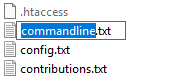
In-line editor box will appear over name of file.
Advertisement
Enter a desired new name and press Enter or click outside of the box to confirm. To cancel renaming press Esc.
Note you cannot rename remote files with SFTP-2 and older.
In preferences you can configure if only base file name (without extension) or whole file name is selected initially when starting rename.
If you want to rename set of remote files using operation mask, use Move to function.